> ## Documentation Index
> Fetch the complete documentation index at: https://docs.firmhouse.com/llms.txt
> Use this file to discover all available pages before exploring further.
# Compatible Shopify plugins
> List of Shopify plugins confirmed compatible with Shopify Native Checkout and Firmhouse subscriptions, plus how to request a compatibility review.
This article covers a list of Shopify plugins with which we have confirmed compatibility. If you're looking into using a plugin that is not in this list, please reach out for our team to advise on compatibility and potential extra steps.
## Cart Plugins
### Upcart—Cart Drawer Cart Upsell
[Upcart—Cart Drawer Cart Upsell](https://apps.shopify.com/upcart-cart-builder) is compatible with Firmhouse.
To make sure your setup works correctly:
1. Add `.upcart-checkout-button,button[name='checkout']` to the **Original Checkout Button Selector** setting on the Checkout Button Injector app embed.
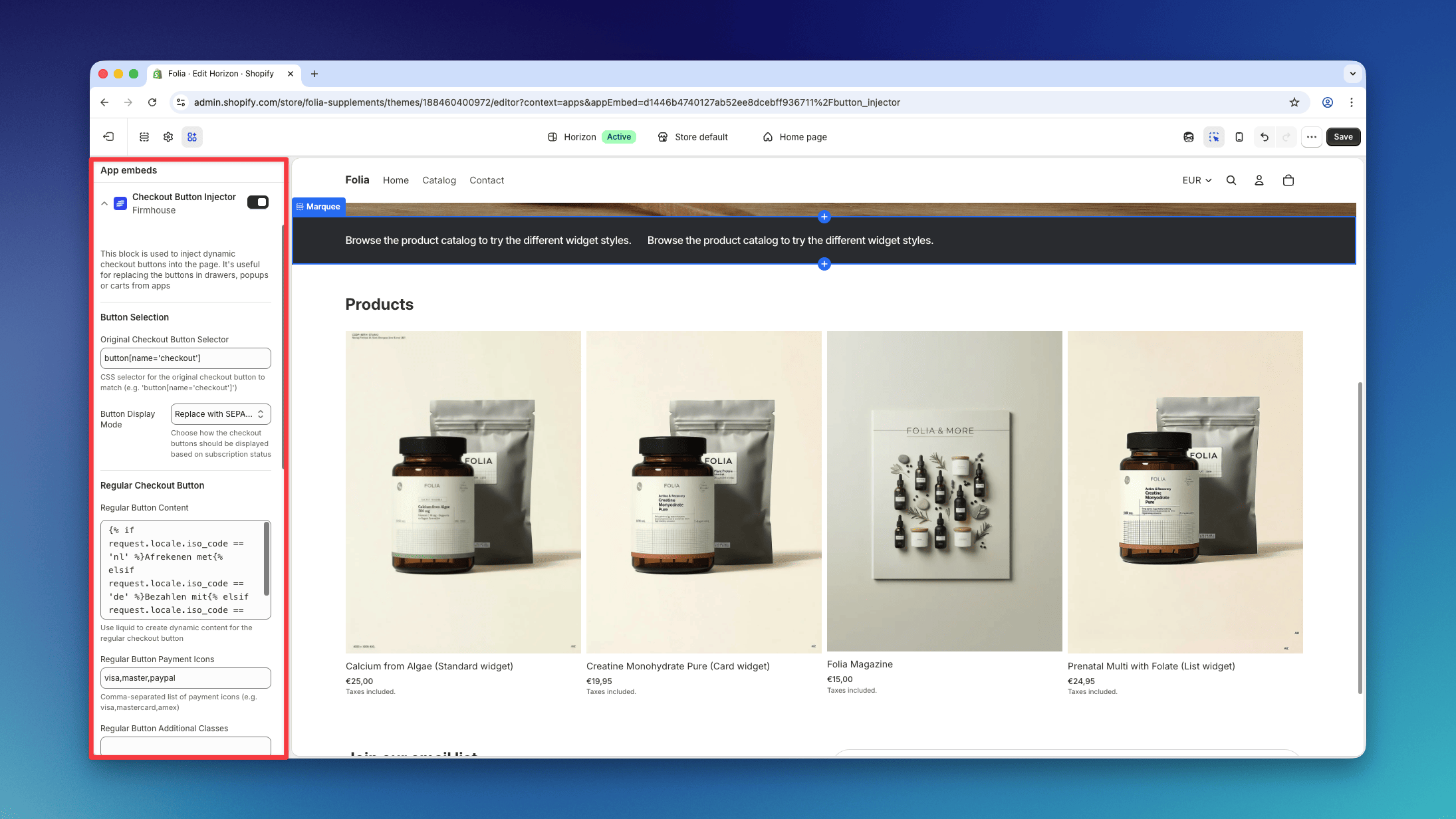 2. Disable the [Render Cart in Shadow DOM](https://intercom.help/as-upcart/en/articles/126) setting for the Upcart Cart, under **Upcart → Settings → Advanced Settings**.
### Opus Cart Drawer Cart Upsell (now Ego Cart Drawer)
[Opus Cart Drawer Cart Upsell](https://apps.shopify.com/opus-cart-drawer-cart-upsell), now named Ego Cart Drawer, can render its checkout button inside a Shadow DOM. The Checkout Button Injector cannot reach elements inside that boundary with a CSS selector.
The simplest setup is to disable Shadow DOM isolation:
1. In the Opus settings, disable **Render cart in isolated Shadow DOM**.
2. Keep both **SEPA Plan Support** and **Checkout Button Injector** enabled in the Shopify theme editor.
3. Set **Original Checkout Button Selector** to:
```text theme={null}
#opus-checkout-btn-2 .cd-main-button,button[name='checkout']
```
4. Save the theme and test both a one-time cart and a subscription cart.
#### Keep Opus Shadow DOM isolation enabled
If you need to keep **Render cart in isolated Shadow DOM** enabled, use Opus's custom script support instead:
1. Keep the **SEPA Plan Support** app embed enabled.
2. Disable the **Checkout Button Injector** app embed so two integrations do not handle the same click.
3. In Opus, open **Cart Editor > Settings > Custom script**.
4. Add the following script after any existing Opus custom code:
Opus normally exposes the cart's `shadowRoot` to code in this field. The script also looks up the `#opus-shadow-container` host directly so it can stop safely if that convenience variable is unavailable.
```js theme={null}
(function () {
"use strict";
var BUTTON_SELECTOR = "#opus-checkout-btn-2 .cd-main-button";
var SUBSCRIPTION_SELECTOR = ".cd-product-item-selling-plan";
var root = typeof shadowRoot !== "undefined"
? shadowRoot
: document.querySelector("#opus-shadow-container")?.shadowRoot;
if (!root) {
console.error("Firmhouse checkout: Opus Shadow DOM not found.");
return;
}
function checkoutButtonFromEvent(event) {
return event.composedPath().find(function (element) {
return element?.matches?.(BUTTON_SELECTOR);
});
}
function cartContainsSubscription() {
return !!root.querySelector(SUBSCRIPTION_SELECTOR);
}
root.addEventListener("click", function (event) {
var button = checkoutButtonFromEvent(event);
// Keep Opus's original checkout behavior for one-time purchases.
if (!button || !cartContainsSubscription()) return;
if (typeof window.firmhouse?.sepaCheckout !== "function") return;
event.preventDefault();
event.stopImmediatePropagation();
button.disabled = true;
button.classList.add("disabled");
Promise.resolve(window.firmhouse.sepaCheckout(event)).catch(function (error) {
button.disabled = false;
button.classList.remove("disabled");
console.error("Firmhouse checkout failed:", error);
});
}, true);
})();
```
This intercepts only subscription checkout clicks. One-time purchases continue through Opus's original Shopify checkout behavior. After saving, test both a one-time cart and a subscription cart.
### Monster Cart Upsell+Free Gift
[Monster Cart Upsell+Free Gift](https://apps.shopify.com/monster-upsells) is compatible with Firmhouse.
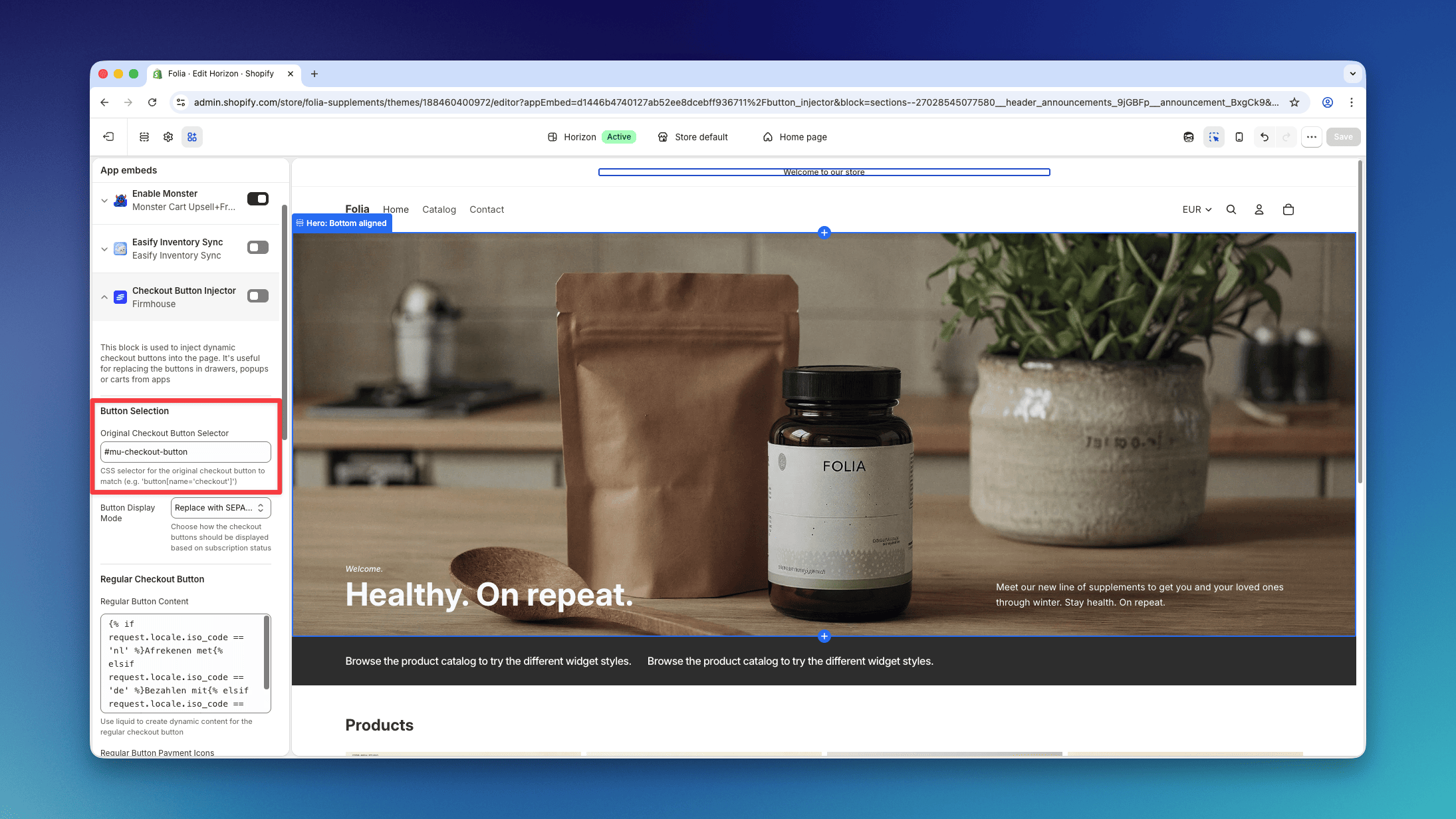
To make sure your setup works correctly, add `#mu-checkout-button` to the **Original Checkout Button Selector** setting on the Checkout Button Injector app embed.
2. Disable the [Render Cart in Shadow DOM](https://intercom.help/as-upcart/en/articles/126) setting for the Upcart Cart, under **Upcart → Settings → Advanced Settings**.
### Opus Cart Drawer Cart Upsell (now Ego Cart Drawer)
[Opus Cart Drawer Cart Upsell](https://apps.shopify.com/opus-cart-drawer-cart-upsell), now named Ego Cart Drawer, can render its checkout button inside a Shadow DOM. The Checkout Button Injector cannot reach elements inside that boundary with a CSS selector.
The simplest setup is to disable Shadow DOM isolation:
1. In the Opus settings, disable **Render cart in isolated Shadow DOM**.
2. Keep both **SEPA Plan Support** and **Checkout Button Injector** enabled in the Shopify theme editor.
3. Set **Original Checkout Button Selector** to:
```text theme={null}
#opus-checkout-btn-2 .cd-main-button,button[name='checkout']
```
4. Save the theme and test both a one-time cart and a subscription cart.
#### Keep Opus Shadow DOM isolation enabled
If you need to keep **Render cart in isolated Shadow DOM** enabled, use Opus's custom script support instead:
1. Keep the **SEPA Plan Support** app embed enabled.
2. Disable the **Checkout Button Injector** app embed so two integrations do not handle the same click.
3. In Opus, open **Cart Editor > Settings > Custom script**.
4. Add the following script after any existing Opus custom code:
Opus normally exposes the cart's `shadowRoot` to code in this field. The script also looks up the `#opus-shadow-container` host directly so it can stop safely if that convenience variable is unavailable.
```js theme={null}
(function () {
"use strict";
var BUTTON_SELECTOR = "#opus-checkout-btn-2 .cd-main-button";
var SUBSCRIPTION_SELECTOR = ".cd-product-item-selling-plan";
var root = typeof shadowRoot !== "undefined"
? shadowRoot
: document.querySelector("#opus-shadow-container")?.shadowRoot;
if (!root) {
console.error("Firmhouse checkout: Opus Shadow DOM not found.");
return;
}
function checkoutButtonFromEvent(event) {
return event.composedPath().find(function (element) {
return element?.matches?.(BUTTON_SELECTOR);
});
}
function cartContainsSubscription() {
return !!root.querySelector(SUBSCRIPTION_SELECTOR);
}
root.addEventListener("click", function (event) {
var button = checkoutButtonFromEvent(event);
// Keep Opus's original checkout behavior for one-time purchases.
if (!button || !cartContainsSubscription()) return;
if (typeof window.firmhouse?.sepaCheckout !== "function") return;
event.preventDefault();
event.stopImmediatePropagation();
button.disabled = true;
button.classList.add("disabled");
Promise.resolve(window.firmhouse.sepaCheckout(event)).catch(function (error) {
button.disabled = false;
button.classList.remove("disabled");
console.error("Firmhouse checkout failed:", error);
});
}, true);
})();
```
This intercepts only subscription checkout clicks. One-time purchases continue through Opus's original Shopify checkout behavior. After saving, test both a one-time cart and a subscription cart.
### Monster Cart Upsell+Free Gift
[Monster Cart Upsell+Free Gift](https://apps.shopify.com/monster-upsells) is compatible with Firmhouse.
To make sure your setup works correctly, add `#mu-checkout-button` to the **Original Checkout Button Selector** setting on the Checkout Button Injector app embed.
 ## Product Bundles for Subscriptions
### Bundles.app — Inventory Sync
[Bundles.app — Inventory Sync](https://apps.shopify.com/bundles) allows you to offer product bundles on subscription and is fully compatible with Firmhouse.
### Kaching Bundles
Kaching Bundles can be used to show quantity offers and subscription options across the Shopify storefront while Firmhouse manages the subscription and recurring discount. The integration requires Firmhouse app embeds, automatic non-Firmhouse plan filtering through **SEPA Plan Support**, and matching percentage-discount tiers in both systems.
Follow [Use Kaching Bundles with Firmhouse](/configure/shopify/use-kaching-bundles-with-firmhouse) for the complete setup.
## Add a Free Gift to the First Subscription Order
### EG Auto Add to Cart Free Gift
[EG Auto Add to Cart Free Gift](https://apps.shopify.com/gifter-cart-auto-inclu) allows you to add a free gift to the checkout order. Due to its capability to select products and selling plans configurations, this will enable you to add a free gift on subscription checkouts (and not on one-time purchases).
## Add an Additional Fee to the Checkout Order
### UpCharge Fees Addons Surcharge
[UpCharge Fees Addons Surcharge](https://apps.shopify.com/product-fees) allows you to add a one-time extra fee on the checkout order and is fully compatible with Firmhouse. Recurring orders will not get a surcharge.
## Product Bundles for Subscriptions
### Bundles.app — Inventory Sync
[Bundles.app — Inventory Sync](https://apps.shopify.com/bundles) allows you to offer product bundles on subscription and is fully compatible with Firmhouse.
### Kaching Bundles
Kaching Bundles can be used to show quantity offers and subscription options across the Shopify storefront while Firmhouse manages the subscription and recurring discount. The integration requires Firmhouse app embeds, automatic non-Firmhouse plan filtering through **SEPA Plan Support**, and matching percentage-discount tiers in both systems.
Follow [Use Kaching Bundles with Firmhouse](/configure/shopify/use-kaching-bundles-with-firmhouse) for the complete setup.
## Add a Free Gift to the First Subscription Order
### EG Auto Add to Cart Free Gift
[EG Auto Add to Cart Free Gift](https://apps.shopify.com/gifter-cart-auto-inclu) allows you to add a free gift to the checkout order. Due to its capability to select products and selling plans configurations, this will enable you to add a free gift on subscription checkouts (and not on one-time purchases).
## Add an Additional Fee to the Checkout Order
### UpCharge Fees Addons Surcharge
[UpCharge Fees Addons Surcharge](https://apps.shopify.com/product-fees) allows you to add a one-time extra fee on the checkout order and is fully compatible with Firmhouse. Recurring orders will not get a surcharge.